Reviewing the 270 Client Eligibility Export Files
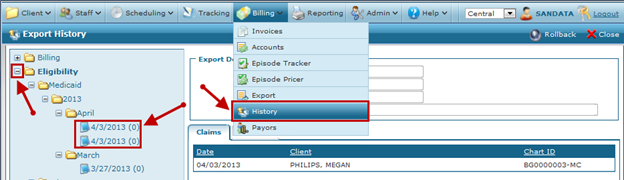
To view this export:
| 1. | Navigate to the Export History screen. |
Main Menu > Billing > History
| 2. | Navigate to the file that was exported. |
Click the (+) sign to expand a folder.
To view this export:
| 1. | Navigate to the Export History screen. |
Main Menu > Billing > History
| 2. | Navigate to the file that was exported. |
Click the (+) sign to expand a folder.
Comments
0 comments
Please sign in to leave a comment.