Splitting Schedules
When needed a single schedule can be split into two shift times. The combined shift times must equal the amount of the original schedule.
| 1. | Navigate to the schedule section of the client’s admission record. |
Main Menu > Client > Schedules
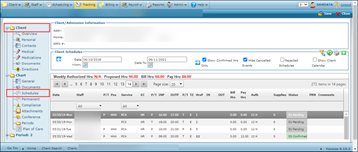
| 2. | Right click on the unconfirmed schedule. |
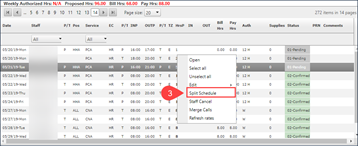
| Note: Split Schedule functionality can only be applied to an unconfirmed schedule in a 'Pending' or 'Hold' status. |

| 3. | Click Split Schedule. |
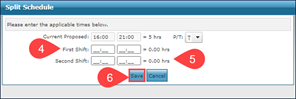
| 4. | Enter the First Shift. |
| 5. | Enter the Second Shift. |
| 6. | Click Save. |
Comments
0 comments
Please sign in to leave a comment.