Creating Agency Accounts Email
Use this process to create an email for a contact to receive alerts.
1. Navigate to the Create - Agency Account's Email screen.
(Security > Alert Settings > Setup Agency Account's Emails > Create)
 |
Note: When creating an Agency Account Email for an internal user please use the
USER CONTACT INFO button ( |


Create Button
2. Enter/Select all applicable fields.
3. Click SAVE.
A notification of confirmation or error displays at the top of the screen.

Create - Agency Account’s Email Screen
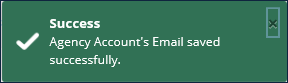
Save Confirmation and Confirmation/Error Notification
Comments
0 comments
Please sign in to leave a comment.