Misc. Options
The Misc. Options area of the EDI Settings tab is used to configure a variety of options related to processing electronic claims.
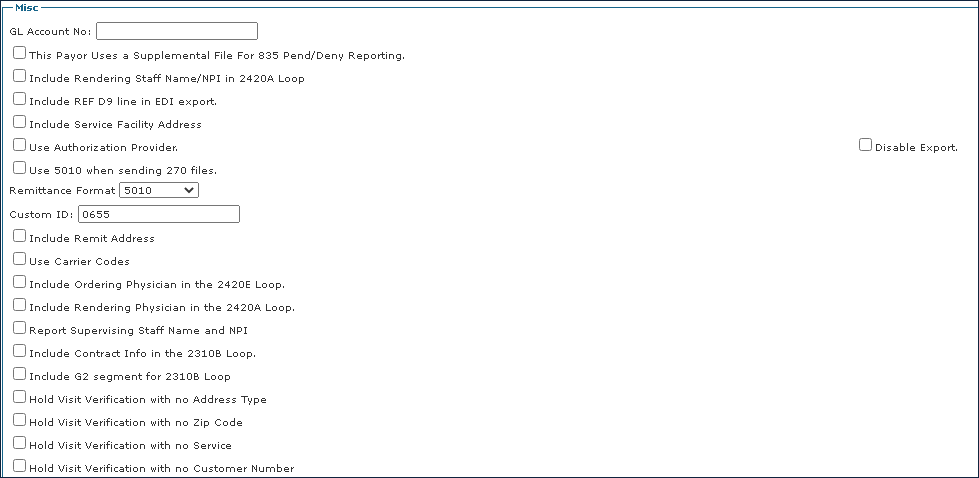
Field | Description |
|---|---|
GL Account No | Use this field to enter the agency’s general ledger number. |
This Payer Uses a Supplemental File for 835 Pend/Deny Reporting | Select this checkbox if the payer uses a supplemental file to report Pending and Denied statuses on the claims. |
Include Rendering Staff Name/NPI in 2420A Loop | Select this checkbox if the payer requires the claim to include the rendering staff's name and NPI in the 2420A loop on the export file. |
Include REF D9 line in EDI export. | Select this checkbox if the payer requires that the REF D9 line be included in the export file. |
Include Service Facility Address | Select this checkbox if the payer requires that the service facility address be included in the export file. |
Use Authorization Provider. | Select this checkbox to use the Authorization Provider. |
Disable Export | Select this checkbox to disable the billing export for this payer. |
Use 5010 when sending 270 files. | Select this checkbox if the payer request that you send 270 files on the 5010 format. |
Remittance Format | Use this drop-down menu to choose the payer's remittance format, 5010 or 4010. |
Custom ID | Use this field to enter the custom identification number set by the agency. |
Include Remit Address | Select this checkbox to include the Remit Address on the export file. |
Use Carrier Codes | Select this check box to use carrier codes. |
Include Ordering Physician in the 2420E Loop. | Select this checkbox if the payer requires the Order Physician information in the 2420E Loop on the export file. |
Include Rendering Physician in the 2420A Loop. | Select this checkbox if the payer requires the Rending Physician in the 2420A Loop on the export file. |
Report Supervising Staff Name and NPI | Select this checkbox if the payer requires the Supervising Staff's name and NPI on the export file. |
Include Contract Info in the 2310B Loop. | Select this checkbox if the payer requires the contract info in the 2310B loop on the export file. |
Include Contract Info in the 2310B Loop | Select this checkbox if the payer requires the contract info in the 2310B loop on the export file. |
Include G2 segment for 2310B Loop | Select this checkbox if the payer requires the G2 segment on the 2310B loop on the export file. |
Hold Visit Verification with no Address Type | Select this checkbox if you need the system to not auto-confirm visits for this payer when there is no address type set on the client's profile. |
Hold Visit Verification with no Zip Code | Select this checkbox if you need the system to not auto-confirm visits for this payer when there is no Zip code set on the client's profile. |
Hold Visit Verification with no Service | Select this checkbox if you need the system to not auto-confirm visits for this payer when there is no service verification on the visit. |
Hold Visit Verification with no Customer Number | Select this checkbox if you need the system to not auto-confirm visits for this payer when there is no customer number set on the client's profile |
Comments
0 comments
Please sign in to leave a comment.