Santrax Options
The Santrax Options area of the Santrax Settings tab displays options for configuring a payer’s EVV settings.
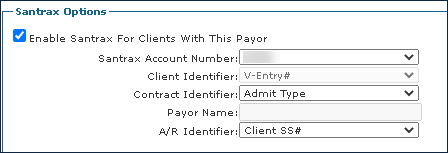
Field | Description |
|---|---|
Enable Santrax for Clients With This Payor | Select this checkbox to enable EVV for the payer. |
Santrax Account Number | Use this field to select the payer’s Santrax Account Number. |
Client Identifier | Use this drop down to select the field that is used as the client identifier for the payer. |
Contract Identifier | Use this drop down to select the field that is used as the contract identifier for the payer. |
Payor Name | Use this field to specify the contract code if the contract identifier set to other.
|
A/R Identifier |
|
Comments
0 comments
Please sign in to leave a comment.