Search Filters
The Search Filters at the top of the screen allow you to narrow the Results List to meet specific criteria.
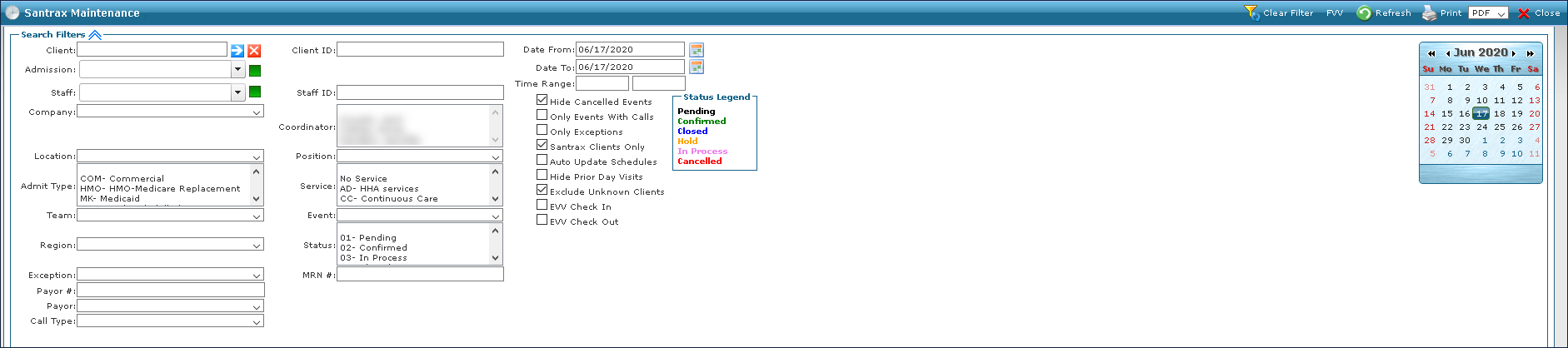
Field | Description |
|---|---|
Client | Use this field to filter schedules by the client’s admissions. |
Admission | Use this field to filter schedules by a client’s specific admission. |
Staff | Use this field to filter schedules by staff. |
Company | Use this field to filter schedules by company. |
Location | Use this field to filter schedules by location. |
Admit Type | Use this field to filter schedules by admit type. |
Team | Use this field to filter schedules by team. |
Region | Use this filter to search for schedules by region. |
Exception | Use this filter to search for schedules by exception. |
Payor # | Use this filter to search for schedules by payer number. |
Call Type | Use this field to filter schedules by call type. |
Client ID | Use this field to filter schedules by client id number. |
Staff ID | Use this field to filter schedules by staff id number. |
Coordinator | Use this field to filter schedules by coordinator. |
Position | Use this field to filter schedules by staff position. |
Service | Use this field to filter schedules by service. |
Event | Use this field to filter schedules by event code. |
Status | Use this field to filter schedules by visit status. |
MRN # | Use this field to filter schedules by medical record number. |
Date From | Use this field to filter schedules in a range, beginning with this date. |
Date To | Use this field to filter schedules in a range, ending with this date. |
Time Range | Use this filter to search for schedules during this time range. |
Hide Cancelled Events | Select this check box to hide schedules with cancelled events. |
Only Events With Calls | Select this check box to filter for only visits with call data attached. |
Only Exceptions | Select this check box to filter for only schedules with exceptions. |
Santrax Clients Only | Select this check box to filter for only schedules with Santrax clients. |
Auto Update Schedules | Select this check box to filter for schedules that were automatically updated by the system. |
Hide Prior Day Visits | Select this check box to hide prior day visits. |
Exclude Unknown Clients | Select this check box to exclude unknown client visits. |
EVV Check In | Select this check box to filter for schedules by EVV Check In time. |
EVV Check Out | Select this check box to filter schedules by EVV Check Out time. |
Comments
0 comments
Please sign in to leave a comment.