Mobile Device GPS Functionality
Sandata Agency Management is fully integrated with Google Maps to show the location of a client's primary address and calls associated with a visit. GPS maps are used to confirm the location of field staff checking in or out using the Mobile Visit Verification (MVV) or Sandata Mobile Connect (SMC) applications.

Icon | Description |
|---|---|
| No Distance Exception: The coordinates for the in-call and/or out-call match the coordinates of the client’s primary address within the distance tolerance threshold. |
| Distance Exception: The coordinates for either the in-call and/or out-call do not match the coordinates of the client’s primary address or are outside the distance tolerance threshold. |
| Unknown coordinates: The system receives a call-in and/or call-out but does not receive the GPS coordinates. |


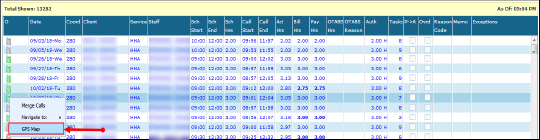
GPS Map Example
Visits have three possible statuses: coordinates matched, coordinates unmatched or unknown location.

Location Pin Legend
Below is the legend for the pins used to indicate GPS distances and verification statuses.
Icon | Description |
|---|---|
| Indicates the location of the client’s address. Hovering over this pin displays the client’s address and its GPS coordinates. |
| Indicates that the location of an in-call or out-call was made within the distance tolerance threshold. Hovering over the pin indicates if it is an in-call or out-call. |
| Indicates that the location of the in-call or out-call was made outside the distance tolerance threshold. Hovering over the pin indicates if it is an in-call or out-call. It also displays the GPS coordinates and distance from the client’s primary address. If the client's location is unknown or with an invalid address, the client's location will appear with coordinates (0,0) and the pin will show on the equator. |


GPS Map Header
The following fields display in the header of the GPS map to provide additional information about the visit:
Icon | Description |
|---|---|
Client Name | The client's name |
Chart ID | The client's chart ID |
Client Stx ID | The client's Santrax ID |
| Staff Name | The employee's name |
| Agency ID | The employee's agency assigned ID |
| Staff Stx ID | The employee's Santrax ID |
Comments
0 comments
Please sign in to leave a comment.