Client DNR Status
Description:
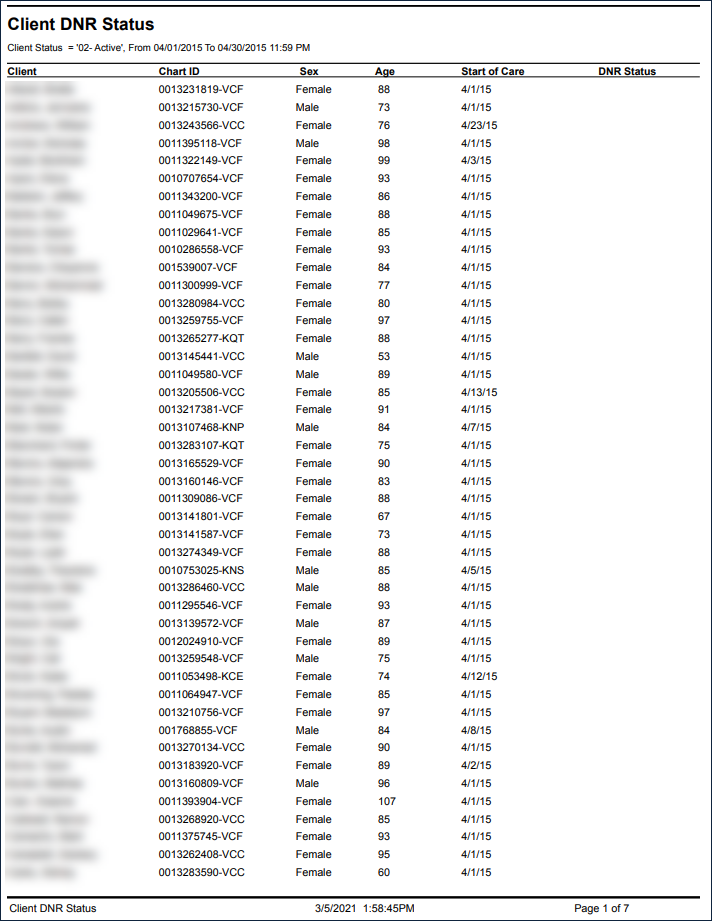
This report displays a list of clients by the selected filter, alongside client information. Client, Chart ID, Sex, Age, Start of Care and DNR (Do Not Resuscitate) status fields are listed for each client.
| Note: Agencies may have their own DNR status numbers and protocol assigned to them. These are set up as Value Items by the individual agency. |

Use:
This report can be used by on-call or administrative staff personnel to direct field staff regarding client DNR status.
Filters
This report can be filtered by:
Field | Description |
|---|---|
Company | The selected company. |
Location | The selected location. |
Admit Type | The selected admission type. |
Team | The selected team. |
Client Status | The selected client status. |
Date From | The selected starting date in a range. |
Date To | The selected ending date in a range. |
Sorting
This report can be sorted by:
Field | Description |
|---|---|
Client Name | Sorts the report by client name in ascending or descending order. Blank if unknown. |
DNR Status | Sorts the report by DNR status in ascending or descending order. |
Client Sex | Sorts the report by the client’s gender in ascending or descending order. |
Client Age | Sorts the report by the client’s age in ascending or descending order. |
Start of Care Date | Sorts the report by the client’s Start of Care date is ascending or descending order. |
Report Output
Each column of the report displays:
Field | Description |
|---|---|
Client | The client’s name (last, first). |
Chart ID | The client’s Chart ID number. |
Sex | The client’s gender. |
Age | The client’s age. |
Start of Care | The client’s Start of Care date. |
DNR Status | The client’s DNR status. |
Report Total | The total number of clients in the report. |
Sample Report
Comments
0 comments
Please sign in to leave a comment.